# 3.5 Verificar distância percorrida em km

&#x20;Acesse o Menu (canto esquerdo da tela) ⏩ Consultas ⏩ Pedidos&#x20;

Pesquise pelo pedido&#x20;

Clique no ícone do mapa (circulado na imagem abaixo)

<figure><img src="/files/ArOhDCQDUdtEmpg56Ahp" alt=""><figcaption></figcaption></figure>

Vai abrir a aba do Google Maps.

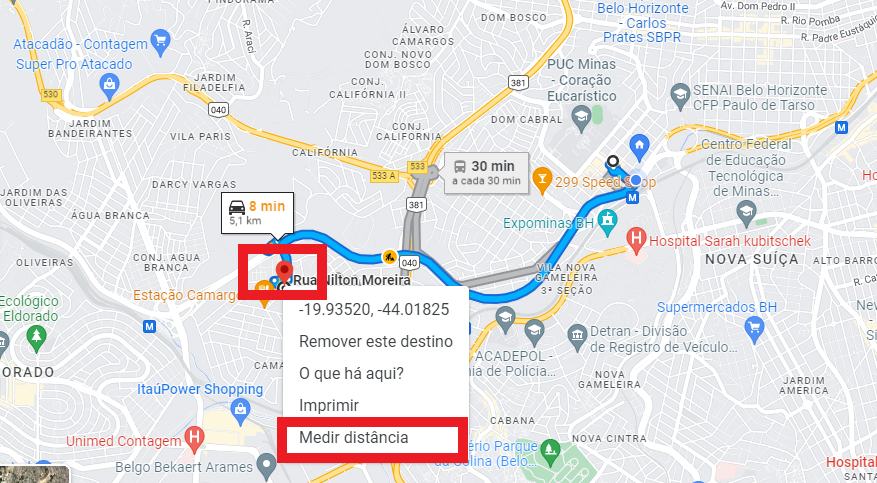
Com o botão direito do mouse, clique em um dos pontos.

Então clique em **Medir distância**

<figure><img src="/files/CkS1fQZw4lbL7pyIKc6l" alt=""><figcaption></figcaption></figure>

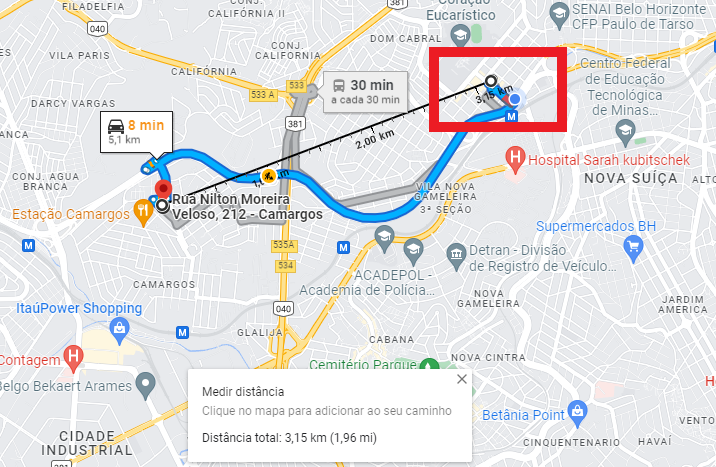
Em seguida, clique no outro ponto do mapa.

Então vai aparecer a distância em km.

Imagem abaixo: 3,15 km

<figure><img src="/files/frANas3zZOiq9tQNSZ2i" alt=""><figcaption></figcaption></figure>


---

# Agent Instructions: Querying This Documentation

If you need additional information that is not directly available in this page, you can query the documentation dynamically by asking a question.

Perform an HTTP GET request on the current page URL with the `ask` query parameter:

```
GET https://ajuda.clientefiel.app/painel-cliente-fiel/configuracoes-basicas/bairros-padrao/3.5-verificar-distancia-percorrida-em-km.md?ask=<question>
```

The question should be specific, self-contained, and written in natural language.
The response will contain a direct answer to the question and relevant excerpts and sources from the documentation.

Use this mechanism when the answer is not explicitly present in the current page, you need clarification or additional context, or you want to retrieve related documentation sections.